Deploy an agent gateway
Create an agent gateway for your service — with an MCP server, payment pathways, a connection test, and analytics.
Once you log in, you can create an agent gateway for your service. When you create an agent gateway, the following features are provisioned for you:
- An x402 payment pathway
- An MPP payment pathway
- An MCP server
- A readiness check and a connection test before the gateway goes live
- Analytics
To create the agent gateway, you will be asked to provide the following information.
API base URL (required)
The base URL is the root domain hosting your API service. This should remain the same for your service regardless of the path or method appended to it. This field is required. If you cannot provide this URL, please email support@bazantic.com to explain how your service works.
Bazantic sets the product website of the listing from the origin of the base URL.
Docs URL (optional)
Paste in the URL of your service's documentation. Be specific: provide the documentation for the exact service you are creating the agent gateway for.
API specification (required)
Every live gateway needs a machine-readable spec — an OpenAPI (or OpenRPC) document, JSON or
YAML. It becomes the gateway's published contract: it is served at the gateway's /spec path and
compiled into its MCP tools. Supply it as a hosted URL, or switch the field to Paste and paste
the document directly.
If your API has no published spec, ask your AI agent to write one: point it at your documentation with a prompt like "Read my API docs and write a complete OpenAPI 3.1 JSON document for this API — every endpoint, parameter, and response — and output only the document" — then paste the result into the field.
Press Analyze. Bazantic reads the specification and opens the review.
Authentication method (required)
The Connection step of the review asks how the gateway authenticates to your API. The form offers four types:
| Type | What the gateway sends to your API |
|---|---|
| API key | Your key. Choose the delivery: Header, Bearer token (e.g. JWT), Query Param, or URL path. |
| Basic Auth | A username and an optional password, as HTTP Basic authentication. |
| No auth | No credential. Select it for a public API. |
| OAuth 2.0 | An access token. Enter the Token URL, the Client ID and the Client secret. Scopes are optional. |
For an API key, prefer a bearer token or a dedicated header. Use a query parameter or a URL path only when the provider requires it.
For OAuth 2.0, the gateway exchanges the client secret for an access token at the token URL.
Press Test connection before you continue:
- For API key, Basic Auth and No auth, the test sends one request to your API. The request carries the credential when the type has one.
- For OAuth 2.0, the test performs the token exchange. It calls no method on your API.
Then press Confirm connection.
Review your gateway
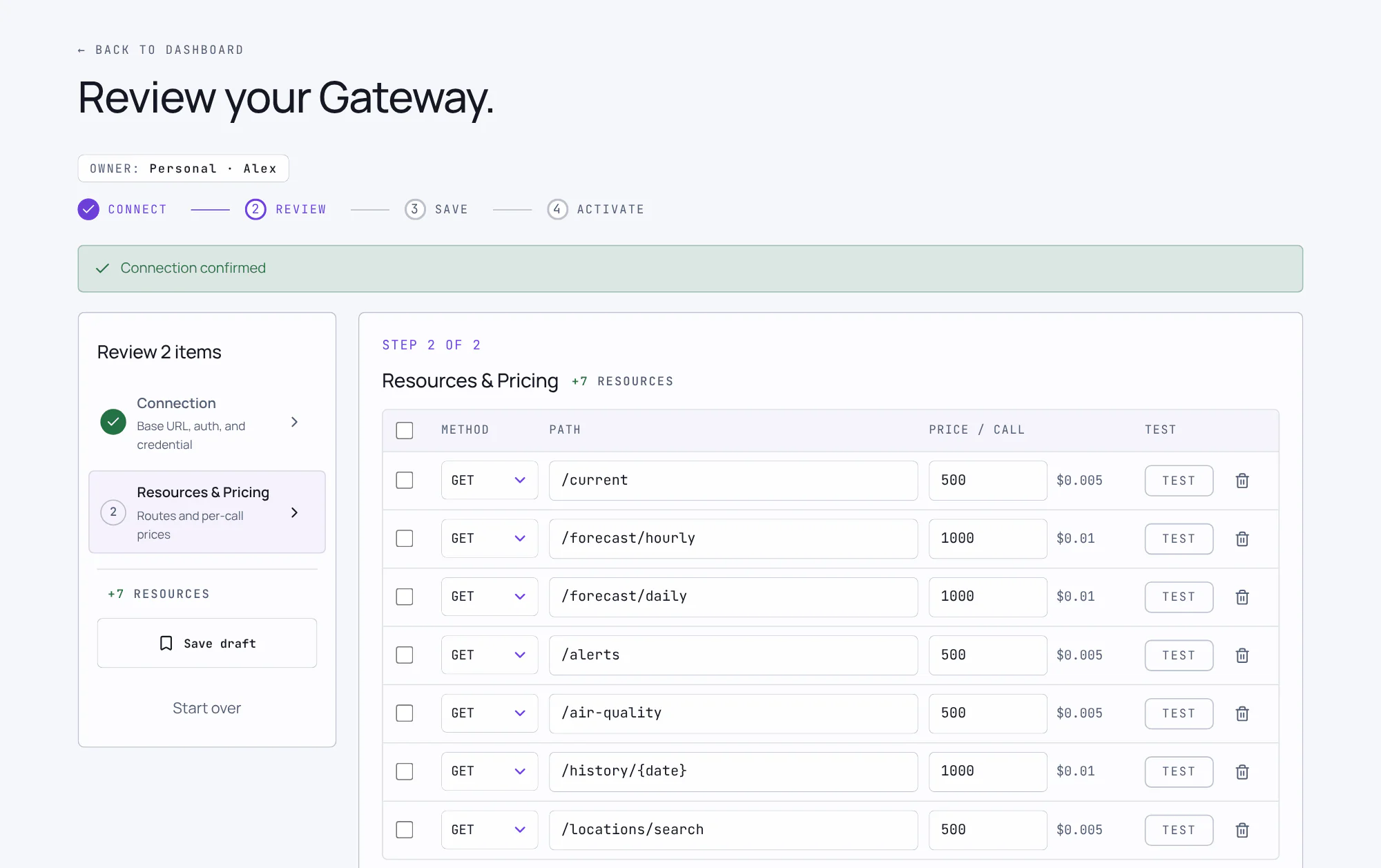
Using the information provided, Bazantic creates a draft specification for your API service. This specification is editable, so please review it carefully and make any necessary changes.
Bazantic ingests the API methods from your website, documentation, and OpenAPI specification. Every method starts at the default price of $0.01 USDC per call — set your own per-method prices here. If there are any errors in the methods, you can adjust them. You can add tags to your service to help with discovery — tags are also autogenerated for you based on your service. Adjust the description and categorization of your service if needed.
Press Confirm Resources & Pricing when the methods and prices are correct.
Save or activate
The flow gives you two actions:
- Save draft saves the gateway as a draft and opens the gateway page. A draft serves no traffic. A saved draft does not keep the credential. Enter the credential on the gateway page before you activate the draft.
- Activate gateway saves the gateway and makes it live. Bazantic then generates your gateway URL, your x402 and MPP payment pathways, and your MCP server.
Before a gateway goes live, Bazantic checks the methods, the specification, the credential and the payout setup. It also sends a connection test to your API. If the test fails, the gateway stays a draft. You can acknowledge a failed test and activate anyway.
Get your gateway URL
Open Gateways in the left sidebar, then open your gateway. The Overview tab shows the
gateway URL in the Payment Gateway card. Press Copy to copy it. Do not assemble the URL
by hand. Bazantic serves more than one URL form, and the form of your gateway depends on its
environment. From the terminal, read it out of baz gateway list --json as endpointUrl (see
Command line).
Every path your API exposes hangs off that URL verbatim.
Put your own name on the URL
The gateway URL above works forever, but it carries a Bazantic hostname and an opaque
slug. Two options replace it with a name your customers recognize: a custom handle such
as acme.bazgateway.com, which needs no DNS work, and a custom domain such as
api.acme.com, which needs two DNS records. Bazantic advertises the new name in the
catalog listing, the agent card, the MCP endpoint, and the 402 payment challenges.
See Custom domains for the steps.
Get your MCP server
Your MCP server is your gateway URL with /mcp appended.
Test your gateway
Open your gateway, open the actions menu, and select Test in Playground. The playground loads with your service preselected and the service picker limited to your own listings. It drives a full request through your gateway — including the x402 payment handshake — so you can watch the 402 challenge, payment signature, and settled response end to end. A gateway on production settles real USDC on Base, unless sandbox mode is on. See Sandbox mode.
Sandbox mode
Sandbox mode lets you test the paid path with no real funds.
- The gateway's actions menu has the switch: Enter Sandbox Mode, and then Exit Sandbox Mode.
- A sandbox gateway takes USDC on Base Sepolia.
- The facilitator settles each payment on Base Sepolia.
- Test USDC comes from the Circle faucet at
https://faucet.circle.com. Select Base Sepolia. - The same address receives on both chains. It needs no new deposit address.
- The production dashboard does not show test funds.
baz curlpays a sandbox gateway with no extra flag.- The playground pays a sandbox gateway on Base Sepolia. It shows the Sandbox label on the service.
Call it from the CLI
Prefer the terminal, or driving your gateway from an agent? Install the Bazantic CLI, then pay per call from your Bazantic balance (a capped, revocable grant) — the x402 payment is settled for you.
# Install the Bazantic CLI
npm i -g @bazantic/cli

# Authorize this device to pay from your Bazantic balance —
# approve once in the browser. The grant is capped and revocable.
baz grant create --name agent-1 --cap 5

# Call any agent gateway. Optional: Make a first payment request.
# Run it yourself, or let an agent
# (a Claude/Codex session, say) call it.
baz curl https://bazgateway.com/<gateway-slug>/<path> --account agent-1 --json
The CLI also registers and inspects gateways, so the whole flow above can be scripted — see Command line, and Skill & MCP for wiring it into an agent.